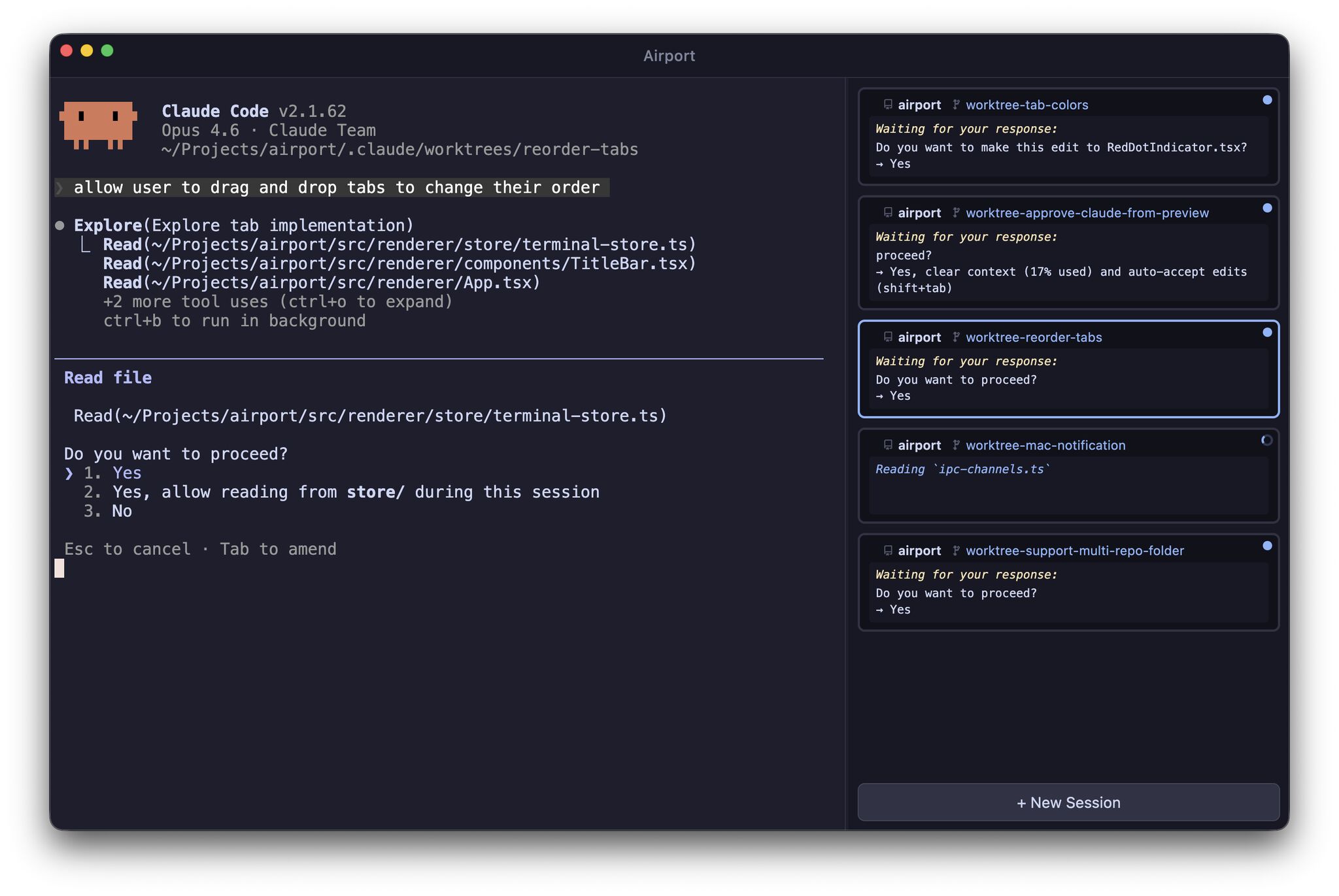
One window for all your coding agents. See every session, know what needs your attention, and keep them all running side-by-side.
Click to copy
Features
No more hunting through scattered terminal windows. All your agent sessions live in a single view. Always oriented, never lost.
See every agent's status at a glance — active, working, or waiting for input. Instantly spot which sessions require your attention without switching between them.
Sift through your coding agents and continuously run tasks side-by-side. Spawn new sessions, keep them all going, and stay in control.
Keyboard Shortcuts
| Cmd + T | New session |
| Cmd + W | Close session |
| Cmd + 1 – 9 | Switch to session 1–9 |
| Cmd + [ / ] | Previous / next session |
| Cmd + J | Jump to next waiting session |
| Cmd + K | Clear terminal |
Getting Started
One command to download and install Airport to your Applications folder.
curl -fsSL https://get-airport.com/install.sh | bash
Open Airport and hit Cmd + T to create terminals. Run Claude Code in each one.
claude
Status updates appear automatically. Hit Cmd + J to jump to whichever session needs you.
Cmd+J → jump to waiting
☆
Built in the open under the MIT license. Bug reports, feature ideas, and pull requests are all welcome.
Star on GitHub